

Drive ecommerce traffic with Pinterest: step-by-step
Pinterest quietly converts browsers into buyers at rates most social platforms can’t match. While brands pour budgets into Instagram and TikTok, Pinterest visitors arrive with purchase intent already formed, searching for exactly what you sell. Conversion rates average 2.31% to 3.1% with ROAS reaching up to 4.8x, making it one of the most underused channels in ecommerce. This guide walks you through the mechanics, the tactics, and the email integration strategies that turn Pinterest into a compounding traffic engine for your brand.
Table of Contents
- Why Pinterest is a high-converting traffic channel for ecommerce
- Pinterest mechanics: Search engine, image SEO, and pinning best practices
- Rich Pins, catalog sync, and seasonal pinning for ecommerce brands
- Integrating Pinterest traffic with email marketing: Opt-ins, audience sync, and list growth
- Common mistakes and troubleshooting Pinterest traffic growth
- Measuring Pinterest results: KPIs, analytics setup, and what success looks like
- Turn Pinterest traffic into email growth and sales with Take Action
- Frequently asked questions
Key Takeaways
| Point | Details |
|---|---|
| Pinterest drives high-intent buyers | Pinterest visitors are often ready to shop, yielding higher conversion rates than most social channels. |
| SEO and visual design are crucial | Treat Pinterest as a search engine and optimize pins with keywords, quality images, and consistent posting. |
| Integrate traffic with email | Send Pinterest visitors to opt-in pages with compelling lead magnets to grow your email list alongside your traffic. |
| Momentum takes time | Expect 3–6 months for significant results, focusing on evergreen pins and seasonal content. |
| Track and adapt | Measure outbound clicks and saves, not just views, to continually improve your Pinterest strategy. |
Why Pinterest is a high-converting traffic channel for ecommerce
Pinterest users don’t scroll to kill time. They plan purchases, save ideas, and return to pins weeks later when they’re ready to buy. That behavioral difference is why Pinterest ecommerce brands consistently report higher average order values than other social channels.
The numbers back this up. Pinterest sales can represent 22% of total revenue for some ecommerce brands, with average order values running 35% higher than other channels and blog traffic growing 433% year over year. That’s not a spike from a viral moment. That’s compounding, evergreen growth.
Here’s how Pinterest stacks up against other platforms:
| Platform | Avg. conversion rate | ROAS | Traffic type |
|---|---|---|---|
| 2.31–3.1% | Up to 4.8x | Evergreen, intent-driven | |
| High volume | Variable | Event-based, paid-heavy | |
| 1–2% | Moderate | Discovery, impulse | |
| TikTok | 0.5–1.5% | Variable | Viral, short-lived |
Pinterest outperforms other social channels in conversion rate for ecommerce, and its traffic doesn’t evaporate after 48 hours like a feed post. A well-optimized pin can drive clicks for months or years.
Key purchase-intent behaviors unique to Pinterest visitors:
- They search with specific product or style terms
- They save pins to revisit before buying
- They follow boards organized around life events (weddings, home renovations, seasonal changes)
- They click through to product pages at higher rates than Instagram users
- They have higher household incomes on average, supporting larger AOV
For ecommerce brands, this is a conversion lift opportunity that most competitors are ignoring.
Pinterest mechanics: Search engine, image SEO, and pinning best practices
Pinterest is not a social network. It’s a visual search engine, and that distinction changes everything about how you approach it. Keyword optimization in boards, pin titles, descriptions, alt text, and image format is the foundation of organic reach.
Here’s how to set up your Pinterest presence for maximum traffic:
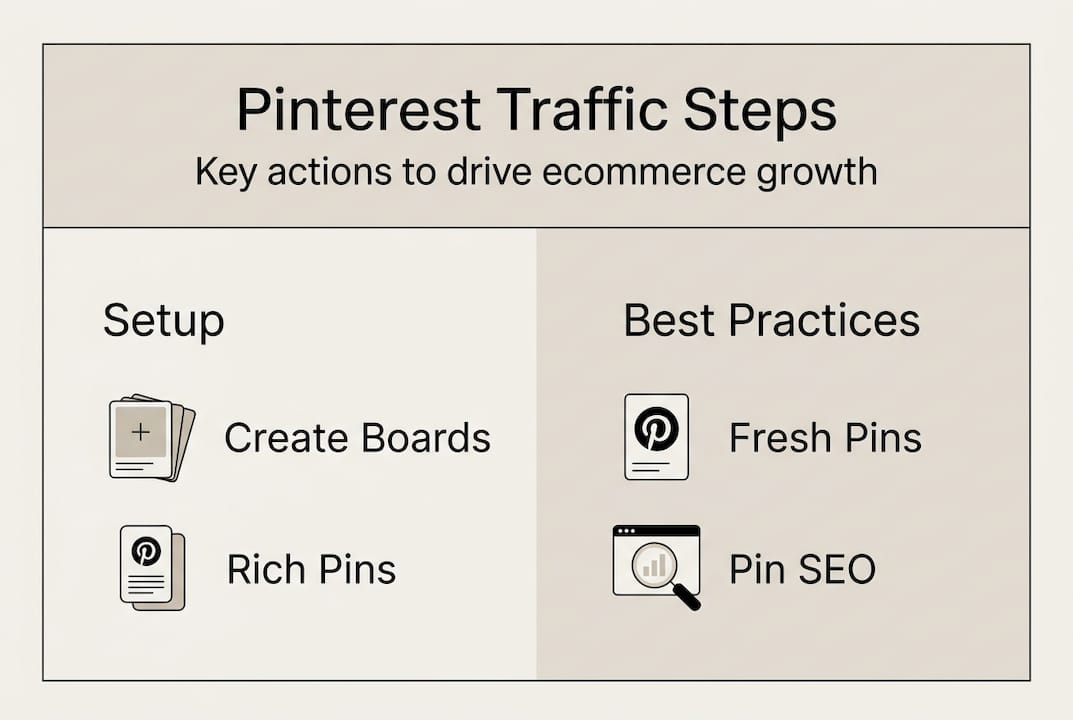
- Create keyword-rich boards. Name boards using terms your audience actually searches, not clever brand language. “Living room decor ideas” beats “Our Aesthetic.”
- Write pin titles with search intent. Lead with the benefit or outcome. “Minimalist kitchen storage ideas” will surface in search. “New arrivals” won’t.
- Optimize pin descriptions. Use 2–3 natural keyword phrases in the first two sentences. Pinterest indexes this text.
- Use vertical images at 1000x1500px. This is the optimal pin format, taking up more feed space and driving higher click-through rates.
- Post 15–30 pins per day, with at least 40% being your own content. Schedule pins for 8–11 PM when engagement peaks.
- Create 3–5 design variations per post. Different visuals for the same URL let you test what resonates without duplicating content.
Fresh pins consistently outperform repins. Batch-posting the same image repeatedly signals low quality to the algorithm. Instead, use repurposed content from your blog, email campaigns, or product shoots to keep your feed active without burning out your team.
For deeper keyword research, Pinterest SEO tactics like using Pinterest’s guided search and autocomplete features reveal exactly what your audience is typing.
Pro Tip: Don’t give everything away in the pin image. A curiosity gap, showing the result without the full how-to, drives far more clicks to your site than a pin that answers the question visually.
Here’s a quick reference for pin design decisions:
| Element | Best practice | Why it matters |
|---|---|---|
| Image size | 1000x1500px vertical | More feed real estate |
| Text overlay | Short, benefit-led | Readable on mobile |
| Posting time | 8–11 PM | Peak engagement window |
| Fresh vs. repin | 60%+ fresh | Algorithm favors new content |
Rich Pins, catalog sync, and seasonal pinning for ecommerce brands
Once your boards and pin process are in place, amplify results with advanced ecommerce strategies. Rich Pins pull real-time product data, including price, availability, and description, directly from your site. When a product goes on sale, the pin updates automatically. That’s a meaningful conversion driver.
Enable Rich Pins and catalog sync through your Shopify integration to automate pin updates and keep product information accurate. Outdated pricing on a pin is a fast way to lose trust.
Seasonal pinning is where many brands leave significant traffic on the table. Pinterest users plan ahead, often 45–90 days before a holiday or seasonal event. If you’re pinning Christmas gift guides in December, you’re already late.
“80% of Pinterest traffic is from mobile. Optimize your landing pages accordingly or you’ll lose the click you worked hard to earn.”
Here’s a practical seasonal and content checklist:
- Pin holiday and seasonal content 45–90 days in advance
- Use video and Idea Pins, which drive 2x engagement compared to static images
- Link every pin directly to a relevant product page or blog post, not your homepage
- Mix lifestyle imagery with product shots to show context and use
- Refresh evergreen boards quarterly with new pin designs
Pro Tip: Lifestyle context converts better than product-only images. Show your product being used in a real setting. A candle on a styled shelf outperforms a candle on a white background every time. Explore more Pinterest tips and tricks for visual styling that drives clicks.

Integrating Pinterest traffic with email marketing: Opt-ins, audience sync, and list growth
Now that you’re creating optimized pins and boards, let’s unlock their full value by connecting Pinterest to your email ecosystem. Pinterest traffic is intent-rich. Capturing those visitors as email subscribers turns a one-time click into a long-term customer relationship.
Here’s how to build that system:
- Create a Pinterest-specific landing page. Match the visual style and language of the pin. Consistency between pin and landing page dramatically improves conversion.
- Offer a relevant lead magnet. Checklists, templates, and style guides perform well with Pinterest audiences. A well-designed lead magnet tied to seasonal content can convert at 20–40%.
- Keep the page fast and mobile-first. With 80% of Pinterest traffic on mobile, a slow or cluttered landing page kills conversions before they start.
- Connect your opt-in form to Klaviyo. Tag subscribers by the pin or board they came from so you can segment your list and send relevant follow-up sequences.
- Sync your Klaviyo audience to Pinterest. This enables retargeting ads to people who opened your emails but didn’t purchase, closing the loop between channels.
Driving Pinterest traffic to opt-in landing pages with targeted lead magnets allowed one retailer to grow their list from 500 to 8,500 subscribers using Klaviyo audience sync. That’s the kind of compounding return that makes Pinterest worth the investment.
Targeted landing pages nurture intent-rich Pinterest visitors into customers far more effectively than sending them to a generic homepage. Pair this with strong lead generation tactics and you have a system that works while you sleep.
Pro Tip: Use a checklist or template as your lead magnet rather than a discount code. Pinterest audiences respond to value-first offers, and a resource builds more trust than a percentage off.
Common mistakes and troubleshooting Pinterest traffic growth
With a system in place for both traffic growth and lead generation, it’s important to avoid critical errors that stall momentum.
The most common pitfalls ecommerce brands hit on Pinterest:
- Relying on repins instead of fresh content. 90% of Pinterest traffic comes from fresh pins, not repins. Recycling the same images repeatedly tanks your reach.
- Batch-posting and going silent. Consistency matters more than volume. Pinning 50 times in one day then nothing for a week confuses the algorithm.
- Ignoring mobile optimization. If your landing page loads slowly or looks broken on a phone, you’re wasting every click.
- Linking to your homepage. Every pin should link to a specific, relevant page. Generic destinations kill conversion.
- Using horizontal images or watermarks. Both reduce reach and click-through rates significantly.
Pinterest momentum typically takes 3–6 months to build. Don’t judge the channel after 30 days. Traffic arrives in seasonal waves, not steady month-to-month growth, so expect surges around key shopping periods.
Pro Tip: Track outbound clicks and saves, not impressions. Impressions tell you how many people scrolled past your pin. Clicks and saves tell you how many people actually wanted what you were offering. Use email segmentation strategies to act on that intent once visitors land on your list.
Measuring Pinterest results: KPIs, analytics setup, and what success looks like
After implementing your Pinterest strategy, here’s how to measure and optimize the results. Start by adding UTM parameters to every pin URL so Google Analytics can attribute traffic accurately. Then set up Pinterest’s native analytics to track on-platform behavior.
Key steps for measurement:
- Tag all pin URLs with UTMs (source: pinterest, medium: social, campaign: board name).
- Track outbound clicks weekly. This is your primary traffic KPI.
- Monitor saves per pin. High saves signal content that will keep driving traffic for months.
- Check CTR by pin design. Average CTR on Pinterest sits at 1.54% organically. Anything above that is a winning format to replicate.
- Run 2–4 week test sprints on new pin designs or landing pages before drawing conclusions.
What to expect over time:
| Timeframe | What you’ll see | |—|—|—| | Month 1 | Low traffic, algorithm learning your content | | Month 3 | Steady outbound clicks, first seasonal surges | | Month 6 | Compounding traffic, evergreen pins driving consistent leads |
Testing in 2–4 week sprints and tracking outbound clicks over impressions gives you a much clearer picture of what’s actually working. Pair Pinterest analytics with target audience research to refine which content themes drive the highest-value visitors to your site.
Once you identify your top-performing pins, double down on those formats, topics, and seasonal angles. Pinterest rewards consistency and relevance, not novelty for its own sake.
Turn Pinterest traffic into email growth and sales with Take Action
Pinterest can be a serious revenue channel, but only if the traffic you generate has somewhere meaningful to go. Sending visitors to a generic homepage and hoping for the best leaves most of that intent on the table.
At Take Action, we help ecommerce brands build the email infrastructure that captures and converts Pinterest visitors into paying customers. From Klaviyo flow setup and list building strategies to audience sync and segmented follow-up sequences, we connect your Pinterest traffic to a retention system that compounds over time. If you’re ready to stop leaving revenue on the table, our email marketing experts can build a custom strategy around your traffic sources, including Pinterest. Explore what a Pinterest traffic strategy integrated with email can do for your brand.
Frequently asked questions
How long does it take to see traffic from Pinterest?
Most ecommerce brands see meaningful momentum within 3–6 months, with traffic arriving in seasonal waves rather than steady month-to-month growth.
What’s the most effective content type for ecommerce brands on Pinterest?
Lifestyle images, product-rich Rich Pins, and video and Idea Pins consistently outperform static product images, with video driving 2x the engagement.
How do I convert Pinterest visitors into email subscribers?
Send Pinterest traffic to dedicated landing pages with targeted opt-in offers. Lead magnets on Pinterest-optimized pages like checklists or templates can grow your list dramatically, with one brand scaling from 500 to 8,500 subscribers.
Do I need to run Pinterest ads to get results?
No. Pinterest offers strong organic evergreen traffic that compounds over time, though ads can accelerate results during seasonal launches or new product releases.
What are the most important KPIs to track for Pinterest traffic?
Focus on outbound clicks and saves rather than impressions. These metrics reflect genuine interest and predict future traffic far better than raw view counts.
Recommended
- Pinterest Traffic for Ecommerce Brands: Boost Email ROI | Take Action Blog | Take Action
- Blog Post Promotion Strategies for Ecommerce Growth | Take Action Blog | Take Action
- Digital Media Strategy: Unlocking Ecommerce Growth | Take Action Blog | Take Action
- Blog - Email Marketing Insights | Take Action | Take Action