

The Role of Klaviyo Forms in Ecommerce Growth
TL;DR:
- Klaviyo forms collect zero-party data that enhances ecommerce personalization and increases revenue. Different form types suit specific visitor intents, with simple, targeted designs performing best. Proper setup, testing, and automation integration maximize the value of form submissions.
Klaviyo forms are the primary intake mechanism for zero-party data in ecommerce marketing, collecting customer-declared information like shopping intent, birthdays, and channel preferences directly from site visitors. Unlike third-party data, zero-party data comes straight from the customer, making it far more accurate and actionable. The role of Klaviyo forms extends well beyond list building. When used correctly, form data feeds personalized automation flows that can increase revenue per recipient up to 10x compared to generic messaging. That gap between generic and personalized is where ecommerce brands win or lose on email.
What types of Klaviyo forms exist and when to use each
Klaviyo supports five primary form types: popup, full page, flyout, embedded, and banner. Each serves a different moment in the visitor experience, and choosing the wrong type costs you conversions.

Popup forms appear over page content and deliver the highest visibility. They work best for first-time visitors who have shown browsing intent, typically triggered after 5–10 seconds on a product or collection page. The tradeoff is intrusiveness. A popup shown too early or too often trains visitors to dismiss it without reading.
Full-page forms take over the entire screen. They suit high-intent moments like post-checkout surveys or dedicated landing pages for lead magnets. Because they demand full attention, they convert well when the offer is strong and the timing is right.
Flyout forms slide in from the side of the screen. They are less disruptive than popups and work well for returning visitors or as a secondary touchpoint after a popup has already been dismissed. Think of them as a softer second ask.
Embedded forms sit directly within page content, such as a blog post footer or a dedicated “join our list” section. They do not interrupt browsing at all. Conversion rates tend to be lower, but the subscribers who do sign up are highly intentional. These forms pair well with email list building content strategies.
Banner forms appear at the top or bottom of the page as a persistent strip. They are the least intrusive option and work well for time-sensitive promotions or cookie consent notices. They rarely collect rich data but keep an offer visible without blocking content.
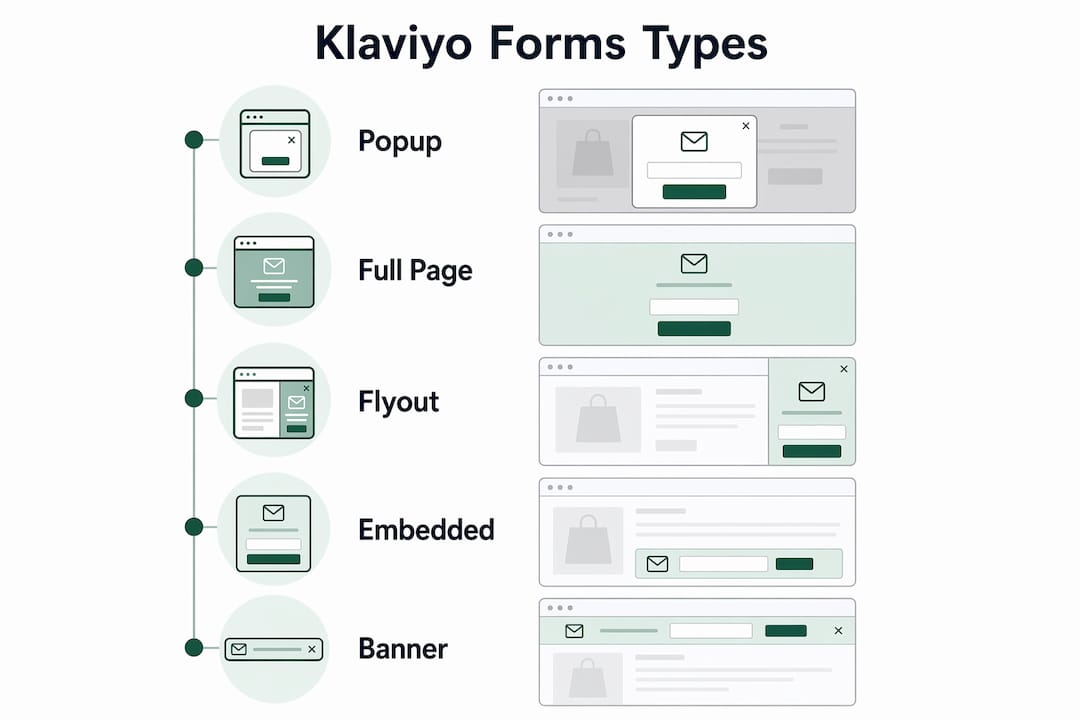
The right form type depends on visitor intent and where they are in the browsing session. A new visitor landing on a homepage responds differently than a repeat customer reading a product description. Match the form format to that context, and your submission rate will reflect it.
How Klaviyo forms enable personalization and segmentation
Forms are the starting point for segmentation strategies that separate high-performing ecommerce email programs from average ones. The data a form collects becomes a profile property in Klaviyo, and those properties drive conditional splits in automation flows.
Consider a simple example. A form asks a new subscriber: “Are you shopping for yourself or as a gift?” That single answer creates two distinct segments. The self-purchaser receives a welcome series focused on personal fit, product education, and loyalty rewards. The gift buyer receives content about gift guides, packaging options, and deadline-aware promotions. The messaging is fundamentally different, and the revenue impact reflects that.
Other high-value segmentation points collected through forms include:
- Category interest (e.g., skincare vs. haircare for a beauty brand)
- Shopping frequency (first-time buyer vs. repeat customer)
- Channel preference (email only vs. email and SMS)
- Birthday or anniversary date for triggered campaigns
Each of these data points triggers a different path in Klaviyo’s flow builder. Expert marketers integrate form data fields as triggers for detailed segmentation and personalized automation flows immediately upon signup. That immediacy matters. A subscriber who declares a category interest on a form and then receives a generic welcome email has already experienced a disconnect between what they shared and what they received.
Pro Tip: Map every form field to a specific Klaviyo profile property before publishing. If a field has no downstream use in a flow or segment, remove it from the form. Every question you ask should have a clear destination in your automation.
The revenue multiplier tied to this approach is real. Personalization using form-collected data like shopping intent, birthdays, and channel preferences can drive up to 10x RPR compared to sending the same message to your entire list. That is not a marginal improvement. It is the difference between email as a cost center and email as a primary revenue channel.
Best practices for designing and optimizing Klaviyo forms
Form design directly affects submission rates, and most ecommerce marketers overcomplicate it. Simple forms with one intentional question consistently outperform multi-question quizzes. Visitors are willing to share one piece of information in exchange for an offer. They are far less willing to complete a five-field survey before they have even browsed your catalog.
Follow these practices to get the most from every form you publish:
- Limit fields to what you will actually use. Collect an email address plus one optional data point. If you cannot name the specific flow or segment that will use a field, cut it.
- Match form design to your brand. Klaviyo’s styling options let you control fonts, colors, button styles, and imagery. A form that looks like it belongs on your site builds trust. A generic form erodes it.
- Set targeting rules for timing and audience. Use targeting rules to control when and to whom a form appears, based on visitor location, device type, browsing frequency, and profile status. Showing a signup form to an existing subscriber wastes an impression and annoys a customer.
- Test one variable at a time. Reviewing form analytics and running A/B tests improves submission rates over time. Test headline copy first, then offer type, then timing. Changing multiple variables at once makes it impossible to know what drove the result.
- Treat forms as data intake tools, not just list growth tools. The most common mistake is relying solely on list growth as the measure of form success. A smaller list of well-segmented subscribers outperforms a large list of undifferentiated contacts every time.
Pro Tip: Run your form on mobile before publishing. More than half of ecommerce traffic comes from mobile devices, and a form that looks clean on desktop often breaks on a small screen. Check button tap targets, font sizes, and close button placement specifically.
How to set up and publish a Klaviyo form step by step
Setting up a Klaviyo form follows a 14-step workflow through the platform’s form builder. The process is straightforward once you know the sequence.
- Navigate to the Sign-up Forms tab in your Klaviyo account dashboard.
- Click “Create Sign-up Form” and choose a starting template or build from scratch.
- Select your form type (popup, flyout, embedded, banner, or full page) based on your targeting strategy.
- Customize the template by editing headline copy, body text, and the call-to-action button label.
- Add or remove blocks using the drag-and-drop editor. Add an image block for visual appeal or a dropdown block for your one intentional data question.
- Configure form styles to match your brand colors, fonts, and button design using the Styles panel.
- Set the success message that appears after submission. Use it to confirm the offer and set expectations for what comes next.
- Assign the form to a Klaviyo list. Every submission maps to a specific list, which then triggers your welcome flow.
- Configure targeting rules for timing (time on page, scroll depth), audience (new vs. returning visitors), and device type.
- Set display frequency to control how often the same visitor sees the form.
- Add a multi-step flow for SMS consent. Multi-step forms separate email and SMS inputs across two screens, improving compliance and opt-in rates for both channels.
- Preview the form on desktop and mobile before publishing.
- Publish the form and confirm it appears correctly on your live site.
- Check the analytics dashboard after 48 hours to verify impressions, submissions, and submission rate.
The entire setup takes under an hour for a standard form. The real time investment comes in the targeting logic and the downstream automation it feeds.
Key takeaways
Klaviyo forms are most valuable when treated as zero-party data collection tools that feed personalized automation, not just as list-growth mechanisms.
| Point | Details |
|---|---|
| Zero-party data drives revenue | Form-collected data like shopping intent and birthdays can increase revenue per recipient up to 10x. |
| Match form type to visitor intent | Popups suit new visitors; embedded forms capture high-intent subscribers; flyouts work as softer second asks. |
| One question per form wins | Simple forms with a single intentional field outperform multi-question surveys in submission rates. |
| Targeting rules reduce friction | Controlling form display by device, location, and profile status keeps forms relevant and non-intrusive. |
| Analytics and testing compound gains | Regular A/B testing and analytics review improve submission rates and downstream personalization quality over time. |
What I have learned about Klaviyo forms after years of ecommerce email work
Most ecommerce brands treat Klaviyo forms as a checkbox. They set up a popup, offer 10% off, collect emails, and call it done. That approach leaves most of the value on the table.
The real opportunity is in what happens after the form submits. A subscriber who tells you they are shopping for a gift is giving you a direct line to a higher-value purchase. A subscriber who selects “skincare” as their interest is telling you exactly which products to feature in their welcome series. That data is worth far more than the email address itself, and most brands never use it.
I have also seen brands inflate their list size by merging form submissions with purchased contacts or by running forms with no suppression rules. The result is a large list with terrible engagement metrics and deliverability problems that take months to fix. Protecting list quality starts at the form level. Set suppression rules so existing subscribers do not re-enter your list through a form, and turn email leads into revenue through flows that act on the data immediately.
The brands that get the most from Klaviyo forms are the ones that treat every form submission as the start of a conversation, not the end of a transaction. They build welcome flows that reference the data collected. They update those flows based on what the analytics show. They test one thing at a time and let the data tell them what works. That discipline is what separates a 2% email revenue contribution from a 30% one.
— Take
How Take-action helps ecommerce brands get more from Klaviyo forms
Designing forms that collect the right data is one part of the equation. Building the automation that acts on that data is the other.
Take-action specializes in both. The agency builds Klaviyo form strategies that go beyond list growth, mapping every form field to a specific segment or flow so no data goes unused. From welcome series to browse abandonment to post-purchase sequences, Take-action connects form submissions to email marketing and retention systems that drive measurable revenue. If your current forms are collecting data that never shows up in your campaigns, that is the gap Take-action closes.
FAQ
What is the role of Klaviyo forms in ecommerce?
Klaviyo forms collect zero-party data directly from site visitors, including shopping intent, preferences, and contact details. That data feeds personalized automation flows that increase engagement and revenue.
How many form types does Klaviyo offer?
Klaviyo offers five form types: popup, full page, flyout, embedded, and banner. Each suits a different visitor intent and level of intrusiveness.
How does form data improve email personalization?
Form fields map to Klaviyo profile properties, which trigger conditional splits in automation flows. A subscriber who declares a category interest or shopping purpose receives messaging tailored to that specific context.
What is the best practice for Klaviyo form design?
Keep forms simple with one intentional data field beyond the email address. A/B test headline copy and timing, and always preview the form on mobile before publishing.
Can Klaviyo forms collect SMS consent?
Multi-step Klaviyo forms separate email and SMS inputs across two screens, which improves compliance and increases opt-in rates for both channels.