

Social Media Content Calendar for Ecommerce Retention
A social media content calendar is the operational schedule that maps every social post to platform, timing, creative asset, and the email or retention action it must trigger. For ecommerce brands running Klaviyo flows, it is not a nice-to-have planning doc — it is the connective tissue between your social activity and your automated revenue.
One-line template you can copy right now:
[Date] | [Platform] | [Pillar] | [Working Title] | [Format] | [Caption] | [Creative Link] | [UTM] | [Owner] | [Status] | [Email Trigger/Segment]
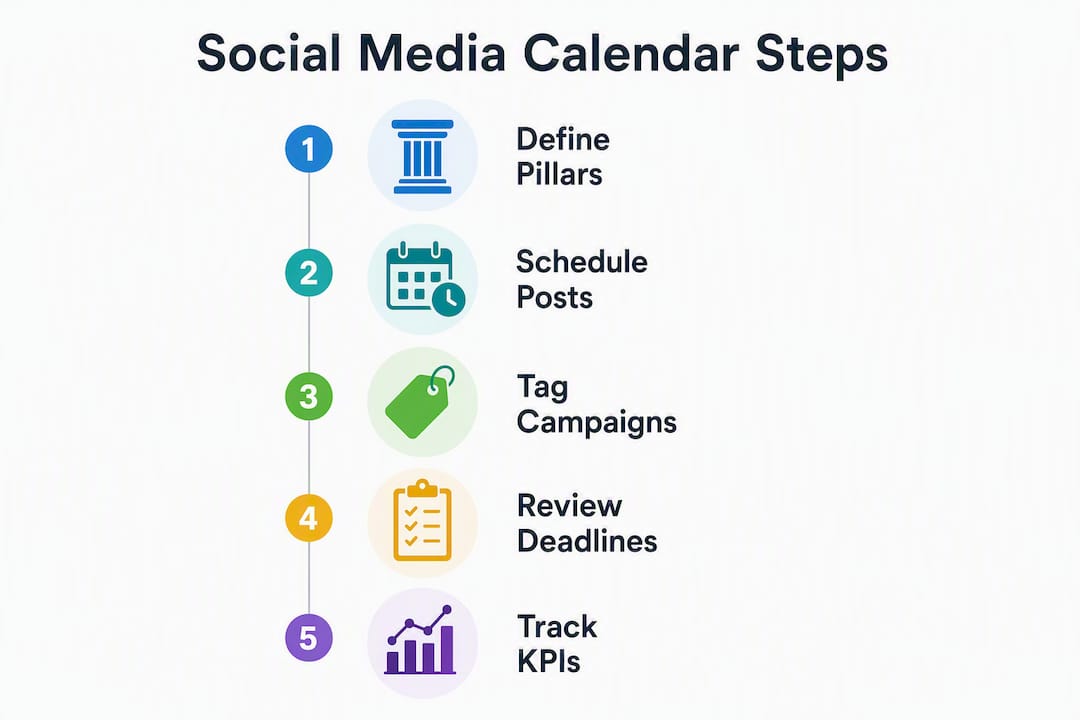
Three things to do in the next 72 hours: (1) define three to five content pillars tied to your lifecycle stages, (2) drop that template into a shared Google Sheet or Notion database, and (3) tag every existing scheduled post with a UTM that maps to a Klaviyo segment.

Pro Tip: Before you add a single post, write your three to five pillar names at the top of the sheet. Every entry that cannot be assigned to a pillar gets deleted, not rescheduled.
Table of Contents
- What is a social media content calendar?
- Why your email retention strategy depends on this calendar
- Core components every social media content calendar must include
- How to build a calendar that feeds email automations
- Ready-to-use templates: 30-day and 90-day views
- Which tools connect your calendar to Klaviyo?
- What KPIs should you track, and how often?
- Common mistakes that kill retention performance
- How to map social posts to specific email flows
- Key Takeaways
- The calendar is only as good as the system behind it
- How Take-action operationalizes your social calendar
- Useful sources and templates
What is a social media content calendar?
A social media content calendar is an execution-layer document: it tracks what posts go live, on which platform, at what time, in what format, and who owns each step of approval. It is not the same as a general content calendar, which covers blogs, email newsletters, video scripts, and long-form assets across a longer planning horizon.
| Dimension | Social media calendar | General content calendar |
|---|---|---|
| Primary users | Social media managers, paid social teams | Content strategists, SEO leads, editorial teams |
| Planning horizon | 1–4 weeks (reactive slots reserved) | 4–8 weeks for anchor content |
| Core fields | Caption, creative, platform, UTM, approval status | Title, keyword, funnel stage, author, publish date |
| Governance | Post-level approval, asset links, scheduling queue | Brief approval, editorial review, CMS scheduling |
| Output | Published posts, UTM-tagged links | Published articles, emails, videos |
Run a dedicated social calendar when your posting volume exceeds three platforms or ten posts per week. Below that threshold, a tab inside a broader editorial calendar works fine — as long as the social-specific fields (UTM, creative link, approval status) are present.
Why your email retention strategy depends on this calendar
Consistent social content does three things for email retention: it grows your list through platform-native lead magnets, it creates behavioral signals that feed Klaviyo segments, and it reinforces lifecycle messaging between email sends.
Think about the touchpoint chain. A product teaser reel on Instagram, tagged with utm_campaign=fall-launch&utm_source=instagram, drives clicks to a landing page. Klaviyo reads the UTM, fires a browse-abandonment flow for anyone who did not convert, and re-engages them within 24 hours. Without the UTM on the social post, that trigger never fires. The calendar is where UTM discipline lives.
Social posts also prime email open rates. A subscriber who saw your product launch reel three times before the email lands is far more likely to open it. That warm-up effect is real, and it is measurable when your UTMs are clean.
Core components every social media content calendar must include
Operational calendars surface status and ownership so nothing stalls in a Slack thread. Here are the fields every entry needs:
| Field | Purpose |
|---|---|
| Working title | Lets any creator start drafting without a separate brief |
| Publish date/time | Platform-specific, based on audience analytics |
| Platform | Instagram, TikTok, LinkedIn, Facebook, etc. |
| Format | Reel, carousel, static, story, thread |
| Caption | Final approved copy |
| Creative asset link | Google Drive, Dropbox, or DAM URL |
| Owner | Who drafts, who approves |
| Approval status | Draft / In review / Approved / Scheduled / Published |
| UTM / CTA | Full UTM string + destination URL |
| Campaign/pillar tag | Maps post to content pillar and campaign |
| Funnel stage | Awareness / Consideration / Retention |
| Email trigger/segment | Which Klaviyo flow or segment this post feeds |
Governance fields matter just as much. Add a review deadline (48 hours before publish), a legal/brand notes column for any claims that need sign-off, and a distribution checklist for cross-posting steps.
Set your content pillars before you populate a single row. Marketing ops specialists recommend three to five core themes — for ecommerce, these typically look like: Product Education, Customer Stories, Behind the Scenes, Promotional, and Retention/Loyalty. If a post cannot be mapped to one of those pillars, it does not belong on the calendar.
Pro Tip: Add a “Pillar” dropdown column with your three to five options. If a creator cannot assign a pillar in under five seconds, the post concept needs rethinking before it gets scheduled.
How to build a calendar that feeds email automations
Building the calendar is a six-step sequence, not a one-time setup.
- Define goals and KPIs first. List growth rate, flow opt-in rate, UTM-attributed sessions, and repeat purchase rate are the four metrics that connect social to email retention. Every pillar you set should map to at least one of them.
- Derive pillars from lifecycle stages. Awareness pillars feed top-of-funnel list growth. Retention pillars (loyalty rewards, VIP content, re-engagement hooks) feed post-purchase and win-back flows.
- Set your cadence and planning horizon. Plan anchor moments (product launches, seasonal promos) 6–8 weeks ahead. Fill regular posting slots 1–4 weeks out. Reserve a portion of slots for reactive content.
- Write working titles, not topic labels. “Instagram carousel — 3 reasons our new serum outperforms single-ingredient alternatives” is a working title. “Skincare content” is not. Working titles let any assigned creator start drafting immediately.
- Assign owners and set SLAs. Draft due two days before review, review complete 48 hours before publish, creative asset uploaded 24 hours before scheduling. Put these deadlines in the calendar, not in a separate doc.
- Build a publish checklist. UTM verified, creative approved, caption spell-checked, CTA link tested, Klaviyo segment or flow confirmed. Check all six before the post goes to the scheduling queue.
Pro Tip: Batch caption writing in two-hour blocks once a week. Writing ten captions in one session is faster than writing one caption ten times across the week, and the voice stays more consistent.
Ready-to-use templates: 30-day and 90-day views
30-day weekly grid (sample)
| Week | Pillar | Platform | Format | Working title | UTM campaign tag |
|---|---|---|---|---|---|
| Week 1 | Product Education | Carousel | “How [Product] works in 3 steps” | edu-jan-w1 |
|
| Week 1 | Customer Stories | TikTok | Video | “[Customer name] result reel” | social-proof-jan-w1 |
| Week 2 | Promotional | Reel | “Flash sale — 24 hours only” | promo-jan-w2 |
|
| Week 2 | Retention/Loyalty | Email + Instagram | Static | “VIP early access — members only” | vip-jan-w2 |
| Week 3 | Behind the Scenes | Static | “How we pack orders efficiently” | bts-jan-w3 |
|
| Week 4 | Retention/Loyalty | Story | “Refer a friend — double points week” | referral-jan-w4 |
For a 90-day view, group weeks into three campaign blocks: Month 1 (awareness and list growth), Month 2 (consideration and social proof), and Month 3 (retention and loyalty). Anchor each block to a product launch or seasonal moment.
Post-level templates
- Product tease: “[Product name] drops [date]. Here is what makes it different: [one-line hook]. Link in bio → [UTM URL].”
- Social-first testimonial: “Real result from [@customer]: [quote]. No filters, no edits. [CTA] → [UTM URL].”
- Retention CTA: “You have [X] points waiting. Here is what you can redeem right now → [UTM URL].”
UTM examples for Klaviyo
utm_source=instagram&utm_medium=organic&utm_campaign=fall-launch&utm_content=reel-oct14utm_source=tiktok&utm_medium=organic&utm_campaign=vip-loyalty&utm_content=video-nov02
Tag every post. UTM parameters in the calendar connect each post to the correct Klaviyo campaign and segment, so attribution never relies on guesswork.
Which tools connect your calendar to Klaviyo?
Template choice should match team complexity: spreadsheets for solo operators, collaborative workflow tools for mid-size teams, and integrated publishing platforms for larger operations.
- Spreadsheet (Google Sheets): Free, universal, zero learning curve. Add the field template above and share with the team. Best for brands posting on one to two platforms.
- Notion or Airtable: Combine calendar, brief, and draft in one database. Airtable’s filtering and views work well for content databases with multiple campaigns running simultaneously.
- Scheduling platforms (Buffer, Later, Hootsuite): Add publishing automation and basic analytics. Buffer and Later both offer free tiers. Connect via Zapier to push published post data (URL, campaign tag, publish time) into a Klaviyo custom property or event.
- Integrated platforms (Sprout Social, CoSchedule): Add approval workflows, digital asset management, and drag-and-drop scheduling that spreadsheets cannot deliver at scale. Worth the cost when your team has more than three content contributors.
For Klaviyo integration, the practical pattern is: social post published → Zapier or Make catches the publish event → writes UTM and campaign tag to a Klaviyo profile property → triggers the mapped flow or updates the segment. For AI-assisted creative production, AI image-to-video workflows can accelerate the asset side of your calendar without adding headcount.
Pro Tip: Add a canonical Post ID field (e.g., IG-2026-0114-001) to every calendar row. Automation tools can use that ID as a unique key to avoid duplicate Klaviyo events when a post is rescheduled.
What KPIs should you track, and how often?
| KPI | What it measures | Reporting cadence |
|---|---|---|
| List growth from social | New email subscribers attributed to social UTMs | Weekly |
| Flow opt-in rate | % of social visitors who trigger a Klaviyo flow | Weekly |
| UTM-attributed sessions | Sessions from social that reach a tracked landing page | Weekly |
| Assisted conversions | Orders where social was a touchpoint before purchase | Monthly |
| Repeat purchase rate | % of customers who buy again within 90 days | Monthly |
| AOV/LTV for social segments | Average order value and lifetime value for social-sourced customers | Monthly |
| Flow conversion rate | % of flow recipients who purchase | Monthly |
Run a weekly ops report covering list growth and UTM sessions. Monthly, review assisted conversions, repeat purchase rate, and flow conversion rates. After each campaign, run a post-mortem: what pillar drove the most opt-ins, which UTM tag generated the most Klaviyo triggers, and which post format had the highest assisted conversion rate.
Calendars that link directly to publishing queues and analytics reduce the gap between what was planned and what actually went live — which is the single biggest source of reporting errors.
Common mistakes that kill retention performance
Most calendar failures trace back to four predictable errors.
- No pillars defined before populating. Failing to set content pillars before filling the calendar is the most costly mistake — posts drift off-brand, and email segments lose their coherence.
- Topic labels instead of working titles. “Skincare content” cannot be drafted. “Carousel: 3 signs your barrier is compromised” can be started in five minutes.
- Missing UTM discipline. A post without a UTM is invisible to Klaviyo. No trigger fires, no segment updates, no attribution.
- No approval SLA. Without a deadline, review bottlenecks kill publish dates and create last-minute scrambles.
Pro Tip: Keep 10–20% of your calendar slots empty and labeled “Reactive.” When a trend breaks or a customer story goes viral, you have a slot ready without bumping a planned post.
Operational checklist to run every Monday morning: confirm all posts for the week have approved creative assets linked, UTMs verified, and owners assigned. Any post missing one of those three fields gets pulled from the queue until it is complete.
How to map social posts to specific email flows
The mapping logic is straightforward: post objective → UTM/campaign tag → Klaviyo trigger or segment → expected action.
| Post type | UTM campaign tag | Klaviyo trigger/segment | Expected action |
|---|---|---|---|
| Product launch reel | launch-[product]-[month] |
Browse abandonment flow | Purchase within 48 hours |
| Testimonial video | social-proof-[month] |
Post-purchase cross-sell flow | Second purchase |
| Flash sale story | promo-[date] |
Active buyers segment | Repeat purchase |
| VIP loyalty post | vip-loyalty-[month] |
Loyalty segment | Referral or review |
| Re-engagement reel | winback-[month] |
Lapsed buyers segment | Return purchase |
For a product launch, the sequence looks like this: publish the launch reel with utm_campaign=launch-oct → Klaviyo reads the UTM on site visit → fires the welcome series re-segmentation for new visitors or the browse-abandonment flow for existing subscribers who did not purchase. For a testimonial reel, the UTM feeds the post-purchase cross-sell flow, surfacing complementary products to buyers who engaged with the social proof.
Social content that drives email engagement works best when the UTM naming convention is agreed on before the first post goes live. Use a consistent structure: utm_source=[platform]&utm_medium=organic&utm_campaign=[pillar]-[month]&utm_content=[format]-[date]. Document it in the calendar header so every team member uses the same format.
Pro Tip: Add an “Event Name” field to your calendar for posts that should fire a Klaviyo custom event (e.g., social_vip_view). Zapier or Make can pass that event name directly to Klaviyo’s track endpoint, giving you granular flow triggers without custom code.
Key Takeaways
A social media content calendar only drives retention when every post is tagged, owned, and mapped to a Klaviyo flow or segment before it goes live.
| Point | Details |
|---|---|
| Define pillars first | Set three to five lifecycle-mapped pillars before adding any posts to the calendar. |
| Use working titles | Write specific, draftable titles so any creator can start without a separate brief. |
| Tag every post with UTMs | Use a consistent UTM structure so Klaviyo can trigger flows and update segments automatically. |
| Plan on 30/90-day rhythms | Map anchor moments 6–8 weeks ahead; fill regular slots 1–4 weeks out with 10–20% reactive slots reserved. |
| Take-action for full setup | Take-action builds and runs Klaviyo-connected social calendars for ecommerce brands needing end-to-end retention ops. |
The calendar is only as good as the system behind it
Most ecommerce brands build a content calendar and then treat it like a posting schedule. That is the wrong frame. The calendar is a trigger system. Every row is a potential Klaviyo event, a segment update, or a flow activation — but only if the UTM is there, the pillar is assigned, and the approval workflow actually ran.
The brands that get measurable retention lift from social are not the ones posting the most. They are the ones where the social team and the email team share the same calendar, the same UTM conventions, and the same KPI dashboard. That coordination does not happen by accident. It requires someone to own the calendar as an operational system, not a content list.
What most guides miss: the reactive slot is not a buffer for laziness. It is a strategic reserve. Brands that fill every slot in advance lose the ability to respond to a viral moment, a customer story, or a competitor stumble. Keep 10–20% open, label it explicitly, and treat it as a planned asset.
How Take-action operationalizes your social calendar
Scheduling tools and spreadsheet templates get you started. What they cannot do is connect your social calendar to Klaviyo flows, enforce UTM discipline across a team, or tell you which pillar is actually driving repeat purchases.
Take-action builds and runs the full system for ecommerce brands: calendar architecture, content pillar definition, UTM naming conventions, Klaviyo flow mapping, and ongoing campaign management. An engagement starts with an audit of your current social and email setup, moves into a calendar build with all fields and governance rules in place, and then runs as a managed operation with weekly reporting and monthly retention reviews. Brands that come in with disconnected social and email channels typically see measurable improvement in flow opt-in rates and repeat purchase attribution within the first 90 days of coordinated calendar operations.
If you are ready to stop treating your social calendar as a posting schedule and start using it as a retention engine, get in touch with Take-action to see what a connected calendar setup looks like for your brand.
Useful sources and templates
The following sources informed the frameworks, field recommendations, and integration patterns in this guide. Consult them for templates, tool comparisons, and governance models.
- Canva Social Media Calendar Guide and Free Templates — best starting point for UTM field structure and planning horizon guidance.
- Storyflow: What Is a Content Calendar? Complete Guide — covers pillar discipline, working title conventions, and integration with publishing tools.
- Sprout Social: Social Media Calendar Guide and Template — strong on governance fields, approval workflows, and enterprise-scale calendar features.
- Sprinklr: How to Create a Social Media Content Calendar — useful for format selection trade-offs across spreadsheet, collaborative, and integrated platforms.
- Averi: How to Create a Content Calendar That Actually Works — practical step-by-step on status workflows and distribution checklists.