

Klaviyo Smart Sending: What Ecommerce Marketers Must Know
TL;DR:
- Klaviyo Smart Sending prevents contacts from receiving multiple messages within a set time window, safeguarding sender reputation. It suppresses subsequent messages for each channel separately, with default windows of 16 hours for email and 24 hours for SMS and push notifications. Most brands misuse it by disabling it to increase volume, but effective configuration involves flow architecture and segmentation strategies.
Klaviyo Smart Sending is a frequency capping feature that prevents contacts from receiving multiple marketing messages within a defined time window, protecting your sender reputation and reducing subscriber fatigue. Every ecommerce marketer running automated flows needs to understand what is Klaviyo Smart Sending before touching a single toggle in their account. Get it wrong and you either over-mail your list into unsubscribes or silently skip messages your customers needed to see. Get it right and Smart Sending becomes one of the most reliable guardrails in your entire Klaviyo email marketing strategy.

What is Klaviyo Smart Sending and how does it work?
Klaviyo Smart Sending is a per-message suppression control built into Klaviyo’s campaign and flow architecture. When a contact receives a message through a given channel, Smart Sending starts a lookback timer. Any subsequent message sent through that same channel within the window gets skipped for that contact.
The default suppression windows are channel-specific: 16 hours for email, and 24 hours for SMS and push notifications. These defaults exist because Klaviyo recognizes that different channels carry different tolerance thresholds. Email inboxes fill up fast. SMS feels more personal and intrusive at high frequency.
A critical detail most marketers miss: channels operate independently. Sending an email to a contact does not trigger the SMS Smart Sending timer. Each channel runs its own clock. This means a contact can receive an email and an SMS within the same hour without either being suppressed, as long as each channel’s own window has cleared.
Here is how the suppression logic works in practice:
- A contact receives a promotional email at 9:00 AM on monday.
- A second flow email fires at 11:00 AM the same day.
- Smart Sending suppresses the second email because only 2 hours have passed within the 16-hour window.
- An SMS sent at 11:00 AM is not affected because the SMS timer is separate.
- The suppressed email is canceled, not rescheduled. It does not queue for later delivery.
That last point matters enormously. Skipped messages are gone. This is not a delay mechanism. Marketers who assume a suppressed flow email will send later are designing flows on a false premise.
Pro Tip: Check your Klaviyo flow analytics for “Smart Sending skipped” counts. A high skip rate signals that your flows are firing too close together, not that Smart Sending is broken.
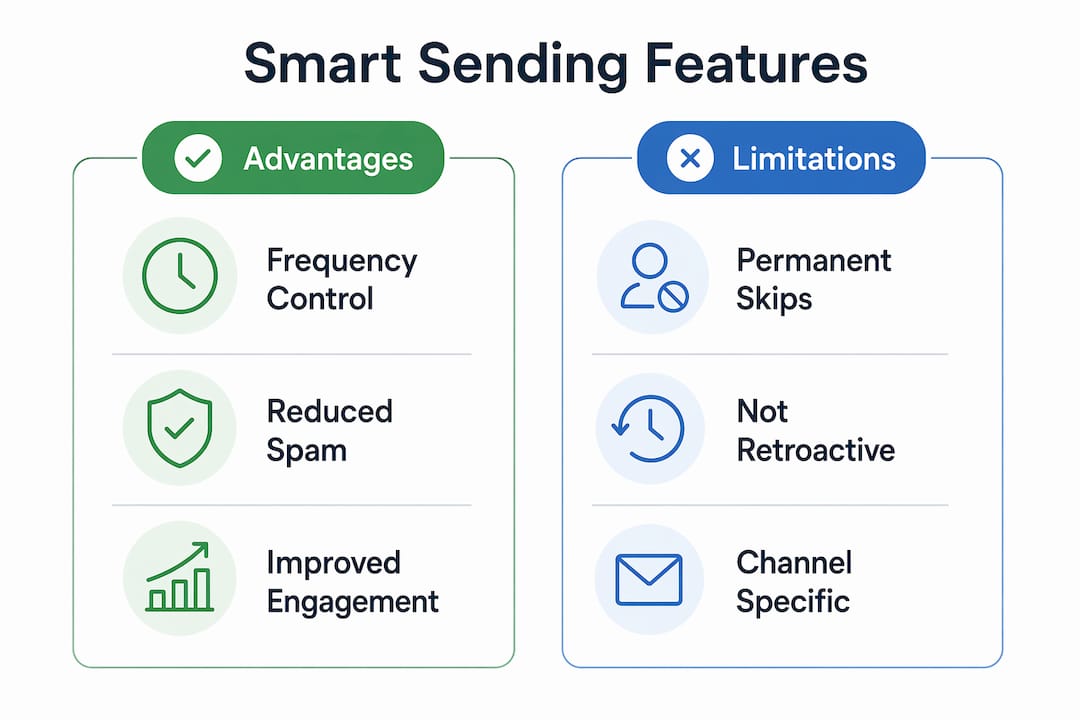
Common misconceptions about the Klaviyo Smart Sending feature
The most damaging misconception is that disabling Smart Sending improves flow email delivery. It does not. Disabling Smart Sending increases the risk of aggressive over-mailing, which leads to lower engagement and higher spam complaints. Spam complaints directly damage your sender reputation with inbox providers like Gmail and Outlook.
A second misconception: Smart Sending is a global account setting. It is not. Smart Sending is a per-message toggle in flows and is enabled by default for campaigns. You control it at the individual message level, not across your entire account. This gives you precise control, but it also means a single misconfigured flow message can cause widespread suppression across your list.
Transactional emails are the one legitimate exception. Order confirmations, shipping notifications, and password resets should have Smart Sending disabled because those messages are expected and necessary regardless of recent send history. Disabling Smart Sending for a transactional message resets the Smart Sending timer for that contact on that channel. This override is intentional and appropriate for critical communications.
Pro Tip: Never disable Smart Sending on a promotional flow just because you want higher send volume. That logic trades short-term reach for long-term deliverability damage. Use flow filters and segmentation instead.
One scenario that catches brands off guard: a customer triggers both an abandoned cart flow and a browse abandonment flow within the same hour. If Smart Sending is enabled on both, one email gets skipped. If Smart Sending is disabled on both, the customer receives two promotional emails in rapid succession. Neither outcome is ideal without deliberate flow architecture.
Best practices for configuring Smart Sending in Klaviyo flows and campaigns
Smart configuration requires reviewing Smart Sending settings flow by flow, not as a blanket account decision. The following steps give you a structured approach:
- Audit every active flow. List each flow, its trigger, and the time delays between messages. Identify where two flows could fire within 16 hours for the same contact.
- Set flow priority rules. Klaviyo allows you to assign priority levels to flows. A post-purchase flow should outrank a win-back flow for a contact who just bought. Flow filters and priority rules give you more control than Smart Sending alone.
- Add engagement-based conditional splits. Route highly engaged contacts through more frequent message paths. Route unengaged contacts through slower, lower-frequency paths. This reduces Smart Sending skips because you are sending fewer messages to contacts who are less likely to open.
- Adjust windows during high-volume periods. During Black Friday and Cyber Monday (BFCM), temporarily adjusting Smart Sending windows can maximize reach without sacrificing overall deliverability. Shortening the email window from 16 hours to 8 hours during a 72-hour sale period is a calculated trade-off, not a permanent change.
- Keep Smart Sending enabled on all promotional flows by default. Only disable it for verified transactional messages where the customer expects to receive the email regardless of recent activity.
One nuance worth knowing: changes to Smart Sending windows are not retroactive. If you shorten the window from 16 hours to 8 hours, that change applies only to future sends. Contacts already in the suppression window from a previous send are not affected until their original timer expires.
Understanding Klaviyo flows at a structural level makes these configuration decisions much clearer. Flow architecture and Smart Sending work together, not in isolation.
Smart Sending vs. other frequency management methods
Smart Sending is one tool in a broader frequency management toolkit. Treating it as your only control mechanism is where most brands go wrong.
| Method | How it works | Best use case | Limitation |
|---|---|---|---|
| Smart Sending | Suppresses messages within a time window per channel | Final safety net for all flows and campaigns | Cancels messages; does not reschedule |
| Manual suppression segments | Exclude contacts who received a message recently | Campaign-level frequency control | Requires manual setup and maintenance |
| Flow filters | Block contacts from entering a flow based on conditions | Preventing overlapping flow triggers | Does not apply to campaigns |
| Conditional splits | Route contacts based on engagement or behavior | Personalizing frequency by engagement level | Adds flow complexity |
| Campaign scheduling | Space campaigns manually across the calendar | Controlling broadcast send frequency | Relies on human discipline, not automation |
Smart Sending acts as a final safety net, not a primary frequency management tactic. Layered segmentation and flow architecture are the primary tools. Smart Sending catches what those tools miss.
For ecommerce brands running retention-focused campaigns, combining all five methods in the table above produces the most consistent results. No single method covers every scenario.
How to troubleshoot Smart Sending skips in Klaviyo
High skip rates in a flow are a diagnostic signal, not a problem to solve by disabling Smart Sending. The root cause is almost always flow overlap or poor timing design.
Common reasons a message gets skipped due to Smart Sending:
- Two flows trigger for the same contact within the suppression window, such as a welcome series and a browse abandonment flow firing on the same day.
- A campaign sends while a flow message is also scheduled within the same 16-hour window.
- SMS Smart Sending suppresses a second text when a shared phone number receives an SMS from any profile linked to that number within 24 hours.
- A flow has no time delays between messages, causing rapid-fire sends that Smart Sending blocks.
To diagnose the issue, pull the flow analytics report in Klaviyo and filter for “Smart Sending skipped.” Cross-reference the timestamps with your campaign send schedule. If a campaign went out at 10:00 AM and your abandoned cart flow fired at 3:00 PM the same day, Smart Sending suppressed the flow email correctly. The fix is to delay the flow trigger or add a flow filter that excludes contacts who received a campaign in the last 16 hours.
Balancing frequency and message importance is the core skill here. A post-purchase thank-you email is worth protecting from suppression. A fourth promotional email in two days is not. Reviewing your email automation setup with that lens will surface the right configuration decisions quickly.
Key Takeaways
Klaviyo Smart Sending is a frequency capping tool that cancels, not delays, suppressed messages, making deliberate flow architecture and segmentation the only reliable way to control message volume without losing critical sends.
| Point | Details |
|---|---|
| Default suppression windows | Email uses a 16-hour window; SMS and push use a 24-hour window by default. |
| Channels are independent | An email send does not affect the SMS Smart Sending timer for the same contact. |
| Skipped messages are canceled | Suppressed messages do not reschedule; they are permanently skipped for that send. |
| Disable only for transactional sends | Order confirmations and shipping alerts should bypass Smart Sending; promotional flows should not. |
| Window changes are not retroactive | Adjusting the suppression window applies only to future sends, not contacts already in a window. |
Why I think most brands are using Smart Sending backwards
Most ecommerce teams treat Smart Sending as an obstacle rather than a design constraint. They see a skipped message and immediately reach for the disable toggle. That instinct is backwards.
Every skip is feedback. It tells you that two parts of your flow architecture are competing for the same contact at the same time. The right response is to redesign the architecture, not remove the guardrail. I have seen brands disable Smart Sending across an entire welcome series because one email was getting skipped, only to watch their spam complaint rate climb within 30 days.
The brands that get the most out of Klaviyo automated email sending treat Smart Sending as the last line of defense in a layered system. They build engagement-based splits that route low-activity contacts into slower sequences. They set flow priority rules so a post-purchase flow always wins over a promotional flow. They schedule campaigns with their active flows in mind, not independently of them.
One underused tactic: temporarily tightening Smart Sending windows during slow periods, not just loosening them during BFCM. A tighter window during a low-send month trains your list to expect consistent, well-spaced communication. That habit pays dividends when you need to increase frequency for a product launch or sale event.
The benefits of Klaviyo Smart Sending are only fully realized when the feature is part of a deliberate system. Used in isolation, it is a blunt instrument. Used alongside flow filters, conditional splits, and engagement segmentation, it becomes a precision tool that protects your list while maximizing revenue per contact.
— Take
How Take-action helps brands get Smart Sending right
Getting Smart Sending configured correctly across a full flow library takes more than reading documentation. It requires a clear picture of how every flow interacts with every campaign across every channel.
Take-action is a Klaviyo-focused email marketing and retention agency that audits flow architecture, Smart Sending settings, and campaign cadence for ecommerce brands. The team reviews each flow individually, identifies suppression conflicts, and rebuilds the frequency management layer so critical messages reach contacts and promotional sends stay within healthy limits. If your Klaviyo account has high skip rates, unexplained drops in flow revenue, or deliverability issues, Take-action’s email marketing services are built to diagnose and fix exactly those problems.
FAQ
What is Klaviyo Smart Sending in simple terms?
Klaviyo Smart Sending is a frequency cap that prevents a contact from receiving more than one message per channel within a set time window. The default window is 16 hours for email and 24 hours for SMS and push.
Does Smart Sending apply to all Klaviyo channels the same way?
No. Smart Sending is managed independently per channel. An email send does not affect the SMS or push notification timer for the same contact.
What happens to a message that Smart Sending skips?
Skipped messages are canceled permanently. Klaviyo does not reschedule or queue them for later delivery, so flow timing and campaign scheduling must account for this behavior upfront.
Should I disable Smart Sending for transactional emails?
Yes. Order confirmations, shipping notifications, and password resets should have Smart Sending disabled because customers expect those messages regardless of recent send history.
Can I change the Smart Sending window, and does it apply immediately?
You can adjust the suppression window in Klaviyo account settings, but changes apply only to future sends. Contacts already within an active suppression window are not affected until their current timer expires.