

Klaviyo Properties Explained: A Practical Guide for Ecommerce
What is a Klaviyo property and why does it matter?
A Klaviyo property is a data attribute stored on a customer profile that tells you who that person is. Think of it as a field in a contact record: their city, their preferred product category, their loyalty tier, their birthday. Every time you segment an audience or personalize an email with a subscriber’s first name, you’re pulling from a profile property.
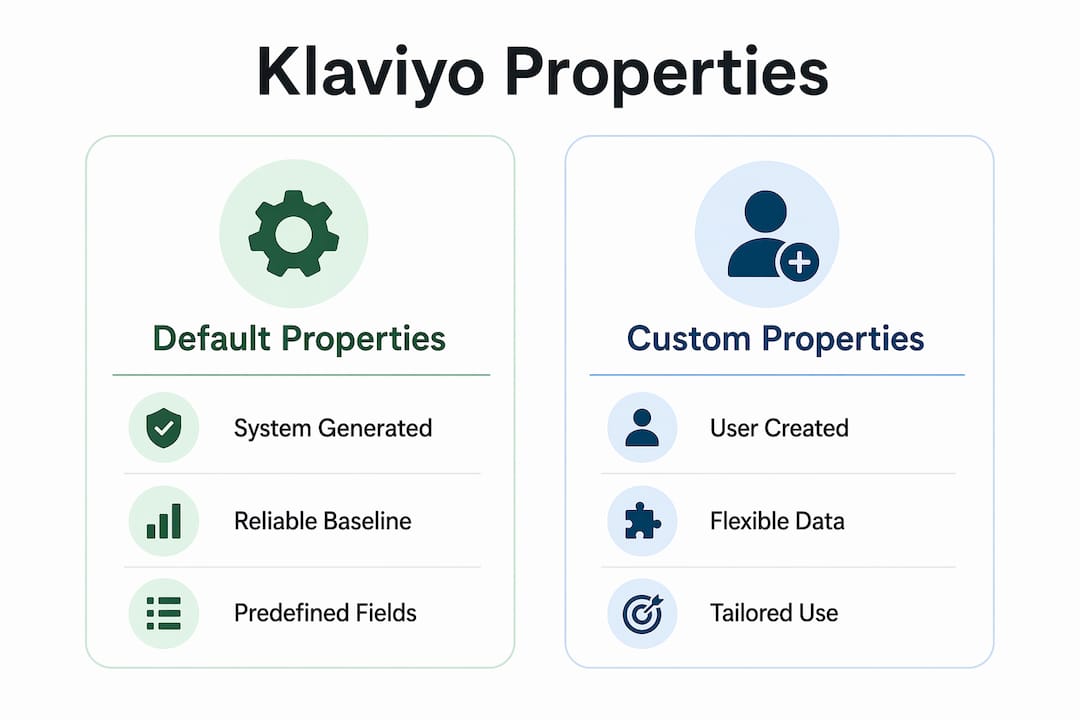
Klaviyo properties come in two forms:
- Default properties (also called Klaviyo properties): pre-built fields that Klaviyo populates automatically from integrations, sign-up forms, and web tracking. Examples include email, first name, phone number, location, consent status, and last active date.
- Custom properties: fields you create yourself, specific to your brand and use case. A skincare brand might store skin type; an apparel store might store preferred fit or gender.
The practical payoff is direct. Once a property exists on at least one profile, it becomes available in the segment builder and as a flow filter. That means you can send a “new arrivals in women’s” email only to subscribers tagged as female shoppers, or trigger a VIP flow only for profiles where loyalty_tier = gold. Ecommerce platforms like Shopify and Magento sync customer details into these fields automatically, so much of the data arrives without any manual work on your end.
Pro Tip: Profile properties answer “who is this person?” Event data answers “what did they do?” Keep that distinction in mind when you decide where to store information.
How default properties differ from custom properties
Klaviyo’s default properties are pre-built fields that the platform manages. Klaviyo adds data to them when a visitor interacts with your website or submits a sign-up form. You cannot rename or delete them, but you can use them in every segment and flow condition.
Common default properties include:
- Email, Klaviyo ID, first name, last name
- Phone number, address, city, state, country, zip code
- Source, consent, SMS consent timestamp
- First active, last active, profile created on, last open, last click
- System fields like
$timezone,$locale,$consent_method, and$consent_form_id
Custom properties work differently. You create them, you name them, and you decide what data goes in them. There is no limit to how many custom properties a single profile can hold. They appear under the “Custom Properties” section in the Information tab of any profile, and properties added by third-party integrations also land there.
| Feature | Default properties | Custom properties |
|---|---|---|
| Who creates them | Klaviyo (system-generated) | You (or your integrations) |
| Examples | Email, first name, last active | Skin type, loyalty tier, quiz answer |
| Can be renamed | No | Yes |
| Data source | Platform integrations, forms, web tracking | Forms, CSV upload, API, flows |
| Available in segment builder | Yes, immediately | Yes, once present on at least one profile |
| Use case | Identity and engagement tracking | Brand-specific demographics and preferences |

The segmentation implications are real. Default properties give you a reliable baseline: you can always filter by location or consent status. Custom properties give you the precision layer, letting you build segments around data that is unique to your brand’s relationship with its customers.
How to add and collect custom properties in Klaviyo
There are several ways to get custom property data onto profiles, and the right method depends on whether you’re working with new subscribers or updating existing ones.
Methods for adding custom properties
- Manual entry via the profile editor. Open any profile in Klaviyo, go to the Details tab, and add a custom property directly. Useful for one-off corrections or testing, not for scale.
- CSV upload. Export your list, add a column for the new property, fill in the values, and re-import. Klaviyo maps the column header to the property name. This works well for migrating data from another platform or adding a batch of historical attributes.
- API integration. If you have a developer or a custom data pipeline, the Klaviyo API lets you push any property value to a profile programmatically. This is the right path for real-time data from loyalty apps, quiz tools, or subscription platforms.
- Sign-up forms and preference centers. Any field you add to a Klaviyo sign-up form becomes a custom property on submission. A preference center works the same way, letting existing subscribers update their own data. You can use these as full questionnaires to collect pet names, skin concerns, clothing sizes, or anything else your brand needs.
- Update profile property action in flows. Inside any Klaviyo flow, you can add an “Update Profile Property” action that writes a value to a profile when someone reaches that step. This is how you tag a subscriber with
completed_welcome_flow = trueat the end of a welcome series, or record afirst_purchase_datewhen someone converts.
Pro Tip: Use hidden fields in sign-up forms to capture source information automatically, like which landing page or campaign drove the signup. The subscriber never sees the field, but it populates on their profile instantly, giving you clean attribution data without asking for it.
Sign-up forms are particularly powerful for building zero-party data. When you ask subscribers directly about their preferences, the data is accurate and consented. A beauty brand asking “what’s your skin type?” at signup can immediately route that subscriber into a personalized welcome flow and a skin-type-specific segment, all from a single form field.
Best practices for managing Klaviyo profile properties
Getting properties onto profiles is the easy part. Keeping them organized and accurate over time is where most accounts run into trouble.
Do these things:
- Use consistent naming conventions. Decide on a format (e.g., snake_case like
loyalty_tieror title case likeLoyalty Tier) and stick to it across every property. Inconsistent naming creates duplicate properties that fragment your data. - Use properties for static or slow-changing attributes. Profile properties represent who a customer is; event data captures what they did. Storing high-frequency behavioral data as properties (like “last product viewed”) creates noise and makes segmentation harder. Use events for actions, properties for identity.
- Audit and clean regularly. Unused or outdated custom properties clutter the segment builder and make it harder to find the fields you actually use. Reviewing and removing obsolete properties keeps your account organized and your data logic clear.
- Understand how reports handle property data. Klaviyo records property values as they existed at the time of an event. If a subscriber’s city changes after they made a purchase, the original purchase report still shows the old city. Current profiles reflect current values, but historical reports do not update retroactively. This matters when you’re analyzing campaign performance by location or segment.
Avoid these mistakes:
- Never name a custom property the same as a default Klaviyo property. If you create a custom property called “Email” or “First Name,” you will create a naming conflict that breaks segmentation and flow filtering. Klaviyo’s default property names are reserved; work around them.
- Don’t store sensitive personal data without a compliance plan. If you’re collecting data from EU-based subscribers, GDPR applies. That means having a lawful basis for storing each property, honoring deletion requests, and not collecting more than you need. Properties like
date_of_birthorgenderrequire clear consent and a documented purpose.
Pro Tip: When syncing with Shopify or Magento, check which fields your integration pushes into Klaviyo by default. Some integrations write customer tags or metafields as custom properties automatically. Knowing what arrives automatically prevents you from building duplicate manual processes.
Customer retention depends on the quality of your data. Brands that invest in proven retention strategies treat profile accuracy as a foundation, not an afterthought.
Glossary of key Klaviyo profile property terms
Clear terminology prevents the kind of confusion that leads to bad segmentation logic. Here are the terms you’ll encounter most often.
| Term | Definition |
|---|---|
| Profile property | A characteristic stored on a contact’s profile, used to create segments, trigger flows, and personalize content. |
| Klaviyo property | A default, system-managed property pre-built into every Klaviyo account (e.g., email, first name, last active). |
| Custom property | A user-created property specific to your brand, stored under the Custom Properties section of a profile. |
| Update profile property action | A flow step that writes or overwrites a property value on a profile when the contact reaches that point in the flow. |
| Segmentation | The process of grouping profiles by shared properties or behaviors to send targeted messages. |
| Flow filtering | Using property conditions to control which profiles enter or proceed through an automated flow. |
| Zero-party data | Information a subscriber voluntarily provides, such as quiz answers or form responses, stored as custom properties. |
| Event data | A record of something a contact did (e.g., placed an order, clicked a link), distinct from profile properties. |
| Attribute snapshot | The value of a profile property at the moment an event was recorded; used in metric reports, not updated retroactively. |
| Property hygiene | The practice of regularly reviewing, renaming, and removing custom properties to keep the account organized. |
A few of these distinctions are worth expanding on. The difference between a profile property and event data trips up a lot of marketers. Properties are static or slow-changing: gender, loyalty tier, quiz response. Events are timestamped actions: a purchase, an email open, a page view. Klaviyo’s segment builder lets you combine both, but mixing them up in your data model creates messy logic. Store what someone is as a property; store what someone did as an event.
The attribute snapshot concept also catches people off guard. If you run a report on purchases by city and then a subscriber moves, the report still shows the original city. That’s not a bug; it’s how Klaviyo preserves historical accuracy. But it means you should interpret property-based reports with that context in mind.
Expert insights on getting more from Klaviyo properties
The marketers who get the most out of Klaviyo properties tend to share a few habits that go beyond the basics.
Build zero-party data sets from day one. Sign-up forms and preference centers are the cleanest source of custom property data because the subscriber provides it directly. A well-designed sign-up form that asks two or three preference questions at signup can populate properties that drive personalization for the entire customer lifecycle. The data is accurate, consented, and immediately usable in flows and segments.

Use the update profile property action to tag engagement dynamically. Inside a post-purchase flow, you can tag profiles based on which product category they bought from, then use that tag to route them into category-specific nurture sequences. At the end of a welcome series, write completed_welcome_flow = true so you can exclude those profiles from future welcome campaigns and avoid redundancy.
Balance properties with event data. Properties work best for attributes that change infrequently. If you find yourself updating a property every time a subscriber takes an action, that’s a signal you should be using event data instead. Overloading profiles with high-frequency property updates slows down your segment logic and creates data you’ll rarely use cleanly.
Maintain property hygiene as a scheduled task. Cluttered accounts with dozens of unused custom properties make the segment builder harder to navigate and increase the chance of using the wrong field in a condition. Set a quarterly reminder to review your custom properties, archive anything unused, and standardize any naming inconsistencies that crept in.
- Use clear, descriptive property names that any team member can understand without explanation.
- Document your custom property schema somewhere your team can reference, especially if multiple people manage the Klaviyo account.
- Test property-based segments before launching a campaign to confirm the logic returns the expected audience size.
At Take-action, the approach to Klaviyo segmentation starts with a property audit. Before building any flow or campaign, the team maps out which default properties are already populated, which custom properties need to be created, and how data will flow in from the ecommerce platform. That groundwork is what separates campaigns that feel personal from ones that feel generic.
For brands that want to go deeper on personalization, Take-action’s work on Klaviyo personalization strategies covers how to combine profile properties with behavioral data for campaigns that actually convert.
If you want expert help building a property-driven segmentation system for your store, Take-action works with ecommerce brands to set up Klaviyo from the ground up, including custom property architecture, flow logic, and ongoing campaign management.
Key Takeaways
Klaviyo profile properties are the data foundation for every segment, flow, and personalized campaign you build, and getting them right from the start saves significant cleanup work later.
| Point | Details |
|---|---|
| Two property types | Default properties are system-managed; custom properties are brand-specific and unlimited per profile. |
| Multiple collection methods | Add custom properties via CSV upload, API, sign-up forms, preference centers, or flow actions. |
| Properties vs. events | Use properties for static attributes like gender or loyalty tier; use event data for actions like purchases or clicks. |
| Naming conflicts break segmentation | Never name a custom property the same as a default Klaviyo property, or you will break flow filters and segment logic. |
| Reports use attribute snapshots | Metric reports record property values at event time and do not update retroactively when profile data changes. |