

What Is Email List Hygiene? A Deliverability Playbook
Email list hygiene is the ongoing practice of keeping your subscriber database valid and engaged so your messages reach real, interested recipients. Two things drive whether Gmail, Yahoo, and Outlook trust your sends: engagement signals like opens and clicks, and technical red flags like hard bounces. Ignore either one and your inbox placement slides.
Do these three things today:
- Suppress every hard bounce in your account, even ones your ESP may have already flagged.
- Pause sending to anyone who hasn’t opened or clicked in the last 90 to 180 days until you run a re-engagement check.
- Run a validation pass on any list segment you haven’t emailed in over a month.
Pro Tip: A list that’s 30% smaller but 90% engaged will almost always outperform the bloated version on revenue per send.
Key Takeaways
Email list hygiene works because inbox providers reward engagement and punish invalid or ignored addresses, so a smaller active list consistently outperforms a bloated one.
| Point | Details |
|---|---|
| Definition | Email list hygiene means keeping your subscriber base valid and engaged, not just large. |
| Clean twice a year minimum | Fast-growing or high-volume senders should clean more often than that baseline. |
| Use behavioral thresholds | Sunset unengaged subscribers after 90 days for weekly sends, six months for monthly sends. |
| Watch five KPIs | Track hard bounce rate, complaint rate, unsubscribe rate, and open/click trends by segment. |
| Bring in specialists when needed | Take-action audits lists, builds re-engagement flows, and fixes SPF/DKIM/DMARC gaps for ecommerce brands. |
Table of Contents
- Why Does List Hygiene Affect Deliverability and ROI?
- How Do You Clean an Email List Step by Step?
- What Tools and Techniques Actually Validate an Email List?
- Which Metrics Actually Signal a List Health Problem?
- When Should You Bring in a Specialist for List Hygiene?
- What We See Most Often With Client Lists
- Get a Deliverability Audit Before Your Next Big Send
- Frequently Asked Questions
- Sources
Why Does List Hygiene Affect Deliverability and ROI?
Mailbox providers don’t count subscribers. They count behavior. Every open, click, deletion, and spam complaint feeds an algorithm that decides whether your next campaign lands in the inbox or the promotions tab, or disappears into spam entirely. Providers weigh engagement far more heavily than raw list size when making that call, according to Klaviyo’s guidance on list hygiene.
The cost of ignoring this shows up twice. First, you pay to email people who will never buy anything. Most email platforms charge based on contact count or send volume, so a list padded with dead addresses is a direct hit to your bill. Second, and more damaging, poor hygiene drags down deliverability for your entire program. Smtp that a rise in bounces and spam complaints directly lowers inbox placement, which means even your best subscribers see fewer of your emails.
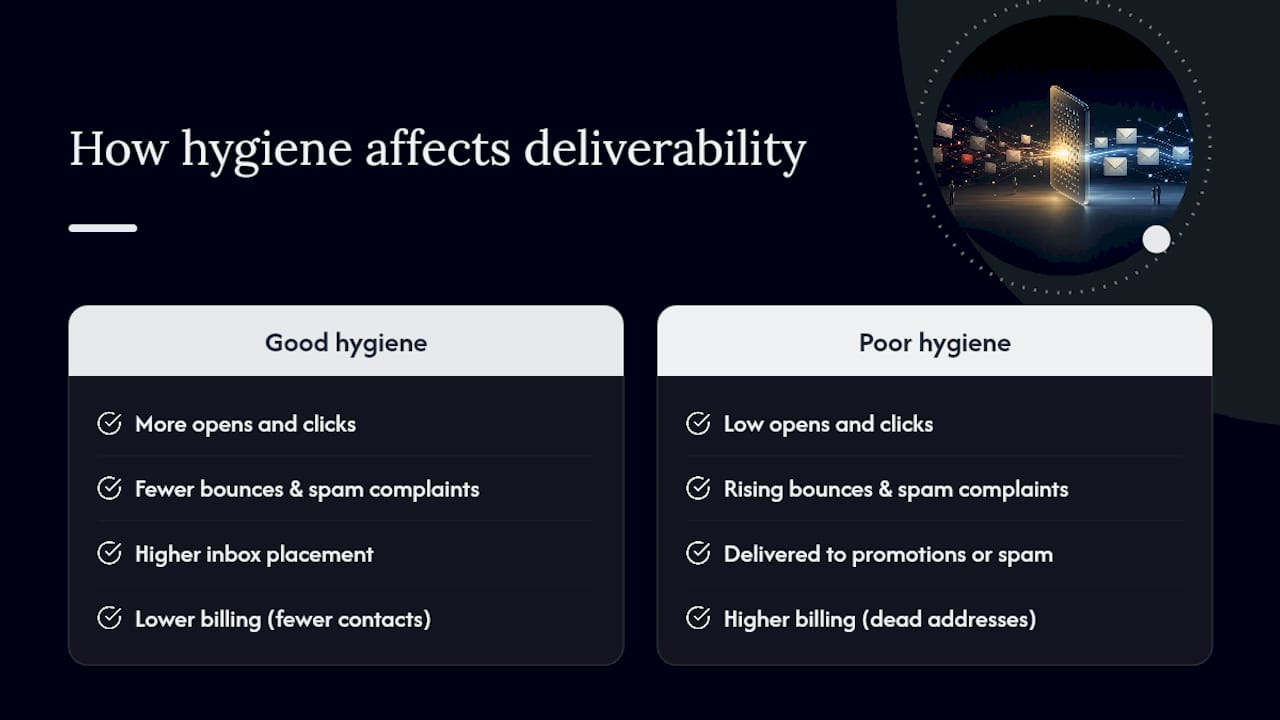
Here’s the math that gets marketers’ attention: spam still accounts for a measurable chunk of all global email traffic, according to Statista. Every filter provider builds is designed to catch patterns that look like that traffic. An unhygienic list, full of bounces and unengaged addresses, resembles those patterns whether you’re actually spamming or not.
How Do You Clean an Email List Step by Step?
Cleaning a list isn’t a single delete button. It’s a sequence, and skipping steps is how marketers accidentally torch a good list.
- Remove hard bounces and role-based addresses immediately. Hard bounces mean the address doesn’t exist. Role accounts like info@ or support@ rarely belong to a real person who opted in. Most ESPs automatically suppress hard bounces after one attempt, but always double-check after a CRM migration or bulk import. Twilio’s list management guidance recommends verifying this manually any time you bring in outside data.
- Catch formatting errors, duplicates, and typo domains. Run a syntax check for malformed addresses (“john@gmailcom”) and an MX check to confirm the domain can actually receive mail. Duplicate entries from multiple sign-up forms also inflate your numbers without adding real reach.
- Segment your unengaged subscribers using a real threshold, not a guess. If you send weekly, 90 days of no opens or clicks is a practical cutoff. Monthly senders should extend that to six months, since their subscribers simply see fewer emails in the same window. Practitioners commonly use a 90-day inactivity window as the trigger for a sunset flow, and that number scales with your cadence.
- Run a structured re-engagement sequence before you delete anyone. Three to four emails works for most brands: a check-in, a value-driven reminder of what they’re missing, and a final “we’ll miss you” message. Letting people self-select out through a sunset flow reduces spam complaints far more than deleting them outright. If you want ideas beyond generic discounts, value-driven re-engagement content tends to outperform a blanket coupon.
- Verify flagged segments before any high-volume send. Catch-all domains accept every email sent to them regardless of whether the specific address is real, which makes them look valid while quietly hurting deliverability. Run these through a validation service before a big campaign, not after.
Quick checklist before you hit send on your next campaign:
- Hard bounces suppressed, not just marked
- Role accounts and duplicates removed
- Unengaged segment isolated by your cadence-based threshold
- Re-engagement sequence completed or in progress
- Catch-all addresses flagged and separately monitored
Pro Tip: Never lead a re-engagement campaign with a discount. You’ll win back people who only respond to sales, not people who actually want your emails, and your long-term complaint rate gets worse, not better.
What Tools and Techniques Actually Validate an Email List?
Validation happens in layers, and skipping a layer is how bad addresses slip through. A syntax check catches typos and malformed strings. A domain or MX check confirms the receiving server exists at all. An SMTP check goes a step further, pinging the mail server to see if the specific mailbox is live. Catch-all handling flags domains that accept everything, and role-account detection filters out generic addresses that were never a real signup.
For tools, you have three practical categories:
- Built-in ESP hygiene features that auto-suppress hard bounces and surface engagement trends, good for ongoing maintenance with zero extra cost.
- Third-party validators that run full syntax, MX, and SMTP checks in bulk, better for pre-campaign scrubs or list imports.
- API-based verification that checks addresses in real time at the point of signup, which stops bad data from ever entering your database.
In-ESP cleanup is free and automatic but shallow. Dedicated validators cost money per check but catch catch-alls and role accounts your ESP won’t flag on its own. Most established senders use both.
Which Metrics Actually Signal a List Health Problem?
Watch five numbers: hard bounce rate, soft bounce trends over time, spam complaint rate, unsubscribe rate, and open/click rates by segment. Everything else is noise by comparison.
For mature senders, a hard bounce rate above 0.5% or a complaint rate above 0.1% should trigger an immediate review, not a shrug. Rising soft bounces over several campaigns in a row usually mean mailboxes are going stale, even if they haven’t hard bounced yet.
- Pause sending to any segment where open rates drop sharply across two or more consecutive campaigns.
- Run a full scrub when hard bounce rate crosses 0.5% or complaints cross 0.1%.
- Escalate to dedicated verification tools before any campaign hitting a list segment you haven’t emailed in 60 or more days.
When Should You Bring in a Specialist for List Hygiene?
Some signals mean it’s time to call in outside help: climbing complaint or bounce rates you can’t explain, sudden drops in inbox placement, a major CRM or platform migration, or simply not having the internal hours to run a proper audit.
A specialized team typically handles the audit and suppression strategy, builds the re-engagement and sunset sequences, diagnoses deliverability problems at the technical level (SPF, DKIM, DMARC records), and sets up ongoing monitoring so the same problem doesn’t resurface in six months.
- Audit current list health and identify the specific segments dragging down performance
- Design and deploy re-engagement flows tied to real behavioral thresholds
- Fix technical authentication gaps that filters use to judge trustworthiness
- Set up recurring monitoring so hygiene stays a habit, not a one-time fire drill
Done well, this work shows up as better inbox placement, higher open and click rates across the board, and fewer wasted sends on addresses that were never going to convert.
What We See Most Often With Client Lists
The pattern repeats across almost every account we touch: a large list, a shrinking engaged core, and a sender reputation quietly eroding underneath it. Our advice is simple. Schedule hygiene reviews around your campaign calendar, especially before major shopping seasons, not after a deliverability problem forces your hand. Pruning almost always increases effective reach.

Get a Deliverability Audit Before Your Next Big Send
If your bounce rate is creeping up or inbox placement feels shakier than it used to, that’s usually a data problem before it’s a content problem. Take-action runs full list audits, builds re-engagement and sunset flows on Klaviyo, and fixes the technical gaps (SPF, DKIM, DMARC) that quietly tank deliverability. It’s the difference between guessing why open rates dropped and knowing exactly which segment caused it.
This matters most right before peak sales periods, when a bloated or unengaged list can sink a campaign you spent weeks planning. If your list hasn’t been audited in the last six months, or you’re not sure it ever has been, request an audit through Take-action and get a clear picture of where your list actually stands before your next big push.
Frequently Asked Questions
What is email list hygiene in simple terms? It’s the ongoing process of removing invalid addresses and unengaged subscribers so your emails reach people who actually open them. It’s a discipline, not a one-time cleanup.
How often should I clean my email list? At least twice a year for most senders, according to Shopify’s guidance, with more frequent cleaning if your list grows fast or you send at high volume.
What’s a bad sign my list needs cleaning right now? A hard bounce rate above 0.5%, a spam complaint rate above 0.1%, or a sudden drop in open rates across a normally reliable segment. Any of those three should trigger an immediate review.
Should I just delete unengaged subscribers? Run a re-engagement sequence first. Letting subscribers unsubscribe themselves through a sunset flow protects your sender reputation better than deleting them outright.
Do I need special software to validate my list, or does my ESP handle it? Your ESP usually handles hard bounces automatically, but it won’t catch catch-all domains or role accounts. A dedicated validator or API-based check fills that gap before large sends.
Sources
- Email list hygiene: Best practices for a clean subscriber list - Klaviyo
- Email list management best practices - Twilio
- Spam email traffic share annual - Statista