

How to Segment Email Lists for Higher Revenue
TL;DR:
- Email list segmentation divides subscribers into targeted groups based on shared traits to improve relevance and conversions. It relies on clean, unified data from demographic, geographic, psychographic, and behavioral categories, with behavioral data being most valuable for ecommerce brands. Effective segmentation requires structured processes, dynamic automation, and focusing on revenue-driving strategies while avoiding common mistakes like over-segmentation and data stagnation.
Email list segmentation is the practice of dividing subscribers into targeted groups based on shared characteristics so you can send messages that are relevant, timely, and far more likely to convert. Segmentation ranks first among all email tactics for improving campaign performance, with 24% of marketers naming it the single most effective lever they have. That number matters because it reflects a shift in how email works. Generic broadcasts are losing ground to precise, behavior-driven messaging. Platforms like Klaviyo, Drip, and Mailchimp have made this approach accessible to brands of every size, and the results speak for themselves.
How to segment email lists: the data you need first
Before you build a single segment, you need to know what data you are working with. The four foundational categories for email segmentation are demographic, geographic, psychographic, and behavioral. Each one tells you something different about your subscriber.

| Data Category | What It Covers | Example Traits |
|---|---|---|
| Demographic | Who the person is | Age, gender, job title, income |
| Geographic | Where they are | Country, city, time zone |
| Psychographic | Why they care | Values, interests, lifestyle |
| Behavioral | What they have done | Purchase history, email opens, site visits |
Behavioral data is the most valuable category for ecommerce brands. Purchase history, engagement frequency, lifecycle stage, and signup source all tell you where a customer stands in their relationship with your brand. A subscriber who bought twice in the last 60 days needs a completely different message than someone who signed up six months ago and never opened a single email.
Data quality determines whether your segments actually work. Fragmented or outdated records produce segments that misfire. Before you start dividing your list, audit your data sources and confirm they feed into a single unified profile per contact. Klaviyo and HubSpot both pull behavioral data automatically from your store, which removes most of the manual work.
Pro Tip: Tag contacts at every touchpoint, including signup forms, purchase flows, and survey responses. Tags are raw labels; segments are the dynamic filters you build on top of them. A working system typically uses 20–50 tags to power 5–15 active segments.
What are the steps to build effective email segments?
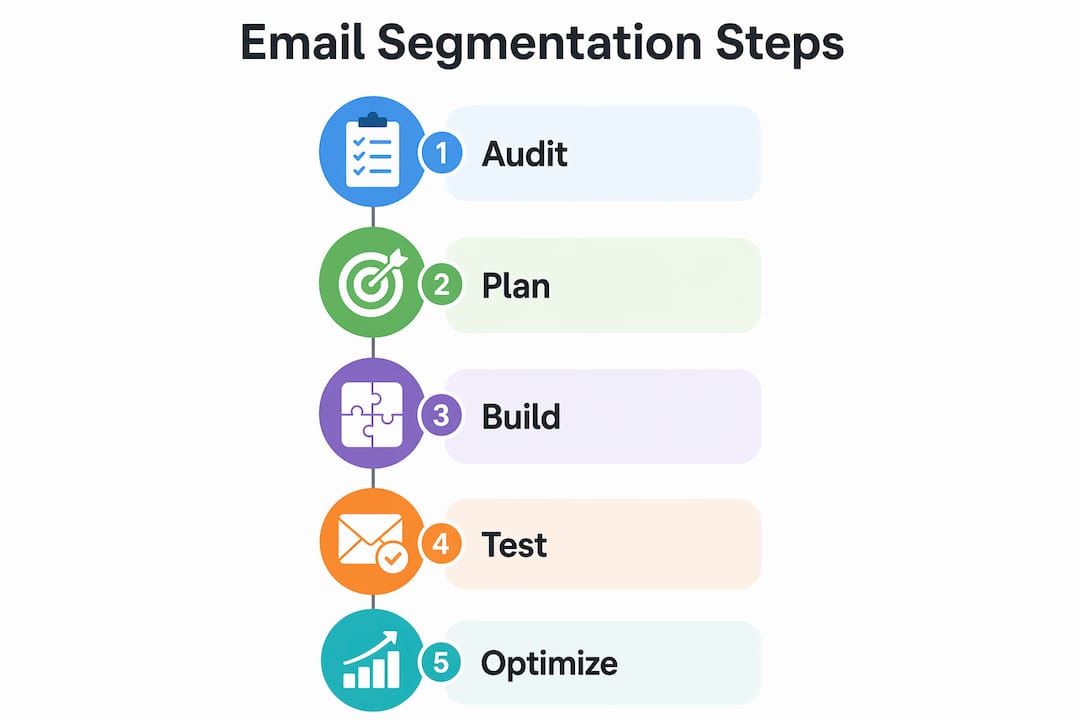
Building segments that actually move revenue requires a structured process, not guesswork. Here is the sequence that works.
- Audit your existing data. Pull a full export of your list and identify which fields are populated, which are missing, and which are unreliable. You cannot segment on data you do not have.
- Define your revenue goals first. Choose 2–3 segments tied directly to outcomes you care about, such as recovering lapsed buyers or converting first-time purchasers into repeat customers.
- Build dynamic, rule-based segments. Set conditions that auto-update as subscriber behavior changes. A segment for “purchased in the last 30 days” should add and remove contacts automatically.
- Write segment-specific content. Each segment needs a message that speaks to its specific situation. A VIP customer email and a win-back email should read nothing alike.
- Test against an unsegmented baseline. Send your segmented campaign to the targeted group and compare open rates, click rates, and revenue per recipient against your last broadcast to the full list.
The revenue impact of segmentation becomes clear quickly. Sending tailored emails to three 3,000-person segments consistently outperforms sending a single untargeted email to a 10,000-person list. Smaller, focused sends generate higher engagement and protect your sender reputation at the same time.
| Step | Action | Output |
|---|---|---|
| 1. Audit | Review data completeness | List of usable fields |
| 2. Plan | Tie segments to revenue goals | 2–3 priority segments |
| 3. Build | Create dynamic rule-based filters | Auto-updating segments |
| 4. Message | Write segment-specific copy | Targeted email content |
| 5. Test | Compare to unsegmented baseline | Performance benchmark |
Pro Tip: Lists under 1,000 subscribers still benefit from segmentation. Separating first-time buyers from non-purchasers on a small list can generate measurable revenue lifts without any complex setup.
Which email segmentation strategies actually work?
The most effective segments share one quality: they reflect a real difference in what the subscriber needs right now. Here are the strategies that consistently produce results.
- First-time buyers. Send a post-purchase sequence focused on product education and a second-purchase incentive. This group has the highest potential for lifetime value growth.
- Repeat purchasers. Reward loyalty with early access, exclusive offers, or product recommendations based on past orders. These subscribers already trust you.
- VIP customers. Define VIPs by spend threshold or purchase frequency. Treat them differently in every send, including dedicated flows and personalized subject lines.
- Lapsed customers. Subscribers who have not purchased in 90 or 180 days need a win-back sequence with a clear reason to return. A discount alone rarely works. Pair it with a reminder of what they bought before.
- Engagement tiers. Divide your list by open and click activity over the last 30, 60, and 90 days. Highly engaged subscribers can receive more frequent sends. Low-engagement contacts need either a re-engagement campaign or suppression.
For a deeper look at how these strategies apply to ecommerce specifically, the segmentation guide for ecommerce from Take-action covers frameworks built around Klaviyo flows and purchase behavior triggers.
| Strategy | Best Use Case | Key Consideration |
|---|---|---|
| First-time buyers | Post-purchase nurture | Needs timely follow-up within 48 hours |
| Lapsed customers | Win-back campaigns | Segment by recency to avoid over-sending |
| VIP customers | Loyalty and retention | Requires clear spend or frequency threshold |
| Engagement tiers | Frequency optimization | Suppression of low-engagement contacts protects deliverability |
Scalability matters as your list grows. Prioritize segments by revenue impact and automation readiness. Segments that require manual updates every week will fall apart under volume.
How do automated segments save time and improve results?
Static lists go stale the moment you create them. A subscriber who was a first-time buyer last month is now a repeat purchaser. If your segment does not update, you are sending the wrong message.
Automated segmentation continuously adjusts as customer behavior changes, keeping your messaging relevant without manual intervention. Platforms like Klaviyo and HubSpot use real-time triggers to move contacts between segments based on actions they take, including purchases, email opens, site visits, and cart abandonment.
Common automation rules worth building immediately:
- Recent opener (last 30 days). Identifies your most engaged subscribers for high-frequency sends.
- Purchase trigger. Moves a contact from prospect to buyer the moment a transaction completes, firing a post-purchase flow.
- Cart abandonment. Flags contacts who added items but did not check out, triggering a recovery sequence within hours.
- 90-day no-open. Moves contacts into a re-engagement or suppression segment to protect deliverability.
Dynamic segments save time and keep campaigns relevant without manual adjustments. That efficiency compounds over time. A brand with 10 automated segments running in Klaviyo is effectively running 10 personalized campaigns simultaneously with no added labor per send.
Pro Tip: Sync your ecommerce platform, CRM, and email tool so contact data updates in real time. Disconnected systems create data lag, which means your segments reflect behavior from days ago rather than right now. For a comparison of tools that handle this well, see the automation tools comparison from Take-action.
What are the most common segmentation mistakes?
Segmentation fails in predictable ways. Knowing the pitfalls in advance saves you significant time and protects your list health.
- Over-segmentation. Building 40 segments when you have the bandwidth to maintain 8 creates chaos. Most segments will go unmessaged and become stale.
- Stale data. Segments built on purchase data that is six months old or email fields that were never properly populated will misfire. Audit your data before you build.
- Segments that are too small. A segment with 50 contacts is rarely worth a dedicated campaign. Set a minimum threshold, typically 200–300 contacts, before treating a group as its own segment.
- Ignoring deliverability. Sending to your full list, including contacts who have not opened in 120 days, damages your sender reputation. Engagement-based suppression using a “no opens in 90 days” filter is one of the highest-leverage moves you can make.
- No performance tracking. If you are not comparing segmented sends against a baseline, you have no way to know which segments are worth maintaining.
The most common mistake is not over-segmenting. It is building segments without a clear revenue hypothesis. Every segment should answer the question: what specific action do I want this group to take, and why are they different from everyone else on my list?
Fixing these issues does not require a platform overhaul. Start by suppressing unengaged contacts, consolidating your smallest segments, and setting a calendar reminder to audit segment performance every 60 days.
Key takeaways
Effective email list segmentation requires clean data, dynamic automation, and segments tied directly to revenue goals rather than arbitrary subscriber traits.
| Point | Details |
|---|---|
| Start with data quality | Audit your contact records before building any segment to avoid misfires. |
| Limit active segments | Maintain 5–15 segments rather than dozens; focused groups outperform fragmented ones. |
| Use dynamic rules | Build segments that auto-update so messaging stays relevant as behavior changes. |
| Prioritize by revenue | Focus first on segments that recover lost revenue or drive repeat purchases. |
| Protect deliverability | Suppress contacts with no opens in 90 days to maintain sender reputation. |
What i have learned after thousands of segmented sends
Most brands come to Take-action with the same problem. They have a list, they have a platform, and they have almost no segmentation in place. When we dig in, we usually find one of two things: either they tried to build too many segments at once and abandoned the whole effort, or they built segments on data that was never clean to begin with.
The advice I give every time is the same. Start with two segments. Pick the one that recovers revenue you are already losing, typically lapsed buyers or abandoned carts, and pick the one that builds on your best customers, typically VIPs or repeat purchasers. Get those two working with solid copy and proper automation before you touch anything else.
The second thing I have learned is that segment definitions need to be written down. Not in your head, not implied by the platform filter. Written down, shared with your team, and reviewed every quarter. Segments drift when no one owns them. A “VIP” segment that was defined as “$200 lifetime spend” two years ago may no longer reflect your actual top customers as your average order value has grown.
The brands that get the most out of segmentation are not the ones with the most segments. They are the ones who treat each segment like a distinct customer relationship and write to it accordingly. That discipline, more than any platform feature, is what separates a list that generates revenue from one that just generates unsubscribes.
— Take
Ready to turn your list into a revenue channel?
Segmentation strategy is only as good as its execution. Take-action specializes in building and automating email segmentation systems for ecommerce brands using Klaviyo, from initial data audits to fully automated flows that run without manual intervention.
If your list is sitting underutilized or your segments have not been updated in months, the email marketing services at Take-action are built for exactly this situation. The team handles campaign strategy, flow setup, and long-term optimization so your email channel compounds over time rather than plateauing. See how Take-action approaches list segmentation for ecommerce to get a sense of the frameworks in practice.
FAQ
What is email list segmentation?
Email list segmentation is the practice of dividing subscribers into groups based on shared traits such as purchase history, location, or engagement level. The goal is to send more relevant messages that drive higher open rates, clicks, and conversions.
How many segments should i start with?
Start with 2–3 segments tied to specific revenue goals. Experts recommend building complexity gradually rather than creating dozens of segments before you have the data or bandwidth to maintain them.
Does segmentation work for small email lists?
Yes. Small lists under 1,000 subscribers can generate measurable revenue lifts by separating first-time buyers from non-purchasers, even without advanced automation in place.
What is the difference between a tag and a segment?
Tags are raw data labels applied to individual contacts. Segments are dynamic filters built from those tags. A well-structured system uses 20–50 tags to power a focused set of 5–15 active segments.
How does segmentation protect email deliverability?
Suppression segments that exclude contacts with no opens in 90 days prevent low-engagement sends that damage your sender reputation. Engagement-based suppression is one of the most direct ways to maintain inbox placement over time.